Showing posts with label Turn It Up Tuesday. Show all posts

Tuesday, December 28, 2010

Tidbit Tuesday

Oooooooh boy, have I got a cool gadget for you!  I't Jenn (jk703) here with your Tidbit for this Tuesday!  Many sales are going on now, and I think you could probably get a great deal for this little piece of joy!


We've all got cameras, and we use them constantly!  I take oodles and oodles of pictures!  All the time, and they total in the thousands!!  I'm sure that a lot of you are just like me!  Then, after I take all those pictures, I have to upload them to my computer so I can edit, share, or scrap them! I used to hate taking all those cords out, finding the right ones and making sure it is all connected correctly!  But then... aaaaaahhhhh... I found these little wonders:

They are called Eye-Fi Cards!  Simply, they are awesomeness that is about the size of a postage stamp!  What do they do?  Well, I take my pictures, come home, turn on my computer and turn on my camera.  The Eye-Fi card will AUTOMATICALLY transfer my images to my computer. INSTANTLY!  No cords, no connections, just instant photo upload!  

For my personal use, I upload to my computer and leave it as it.  Later, when I am sitting down and plan to work with my photos,  (I have a Mac and I run multiple photo libraries) I click on my Photo Manager and choose the correct library that I want my pictures to be saved at, and once it loads, it also loads my new pictures!  WOW, right?!  

You can choose different options for the card, as well as choosing instant uploads to other outside websites, such as Facebook, Shutterfly, Snapfish, Flikr, or one of 20 other sites!!!  Depending on the card you choose, you can do video also!  Here is a chart that shows the differences between the cards!  


If you can, go check them out!  They really are as easy as that, and make my life so much easier that I don't have to do go through the processes of uploading photos - cause all I have to do now is press a button!  

Let me know what you think!
Have a great day!
Jenn
(jk703)


Read more...

Tuesday, May 18, 2010

Turn It Up Tuesday!

Hi everyone! Erin here with another edition of Turn It Up Tuesday! Today I thought I would share a fun site with everyone - Baby Love Letters. The purpose of this blog is to help parents create a meaningful letter to their child, even if it's only one paragraph long and takes 15 minutes to write. Each Friday a new question is posted on the blog. As scrappers - this is a great starting point for creating a page with meaningful journaling directed towards our love ones. So the next time you are at a loss of what to scrap about - check out this site!

Read more...

Tuesday, May 11, 2010

Turn it up Tuesday!

Well, somehow my blog post for today disappeared- sorry this comes to you late! Hello scrappers! Stephanie (schock77) here with a cool website for you to check out for your "non-digi" shopping!

I'm a full time working mom to a 6 year old and 4 year old, so time is VERY short... but in this economy I need to be more frugal too. So, rather than clip coupons, I check Retail Me Not when I go to shop online. It saves me time AND money at places I really shop at. Plus, I don't have to search forever for what I need. Be sure to check it out next time you shop online... and if you are shopping for digiscrap stuff, search no further than Jennifer's store at The Digichick. ;) Happy shopping!

Read more...

Tuesday, April 27, 2010

Turn It Up Tuesday - Comfy Cozy Beds

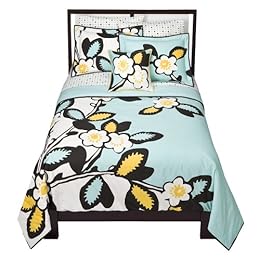
Hi everyone! Jackie here bringing you today's edition of Turn It Up Tuesday! I'm really excited about it too because I just love looking at bedding sets and dreaming about all the fun ways my bedroom could look if I had good decorating sense. But I don't, so instead I drool over bedding I see in advertisements and stores. I just have to share some that I saw recently - the colors are just amazing. (Maybe Jennifer can be inspired by some of these and make some cute kits? What do you think? **wink, wink**)

I do believe I'd fall asleep the instant I would lay down on them. How about you?

from Target


from Target


If you have a favorite bedding item you've been eyeing (or have already) link me up. I'd love to see it!

Read more...

Tuesday, April 20, 2010

Turn It Up Tuesdays!!!

Hi all, my name is Trish, and I'm pretty new to Jennifer's awesome team. I've been scrapping for three years now and I know that one of my biggest problems is coming up with ideas. I'll have the kit I want to use, the pictures I want to use, but then I'll just get stuck on a title and journaling. I'll sit here at my computer and go "Hmmmmm...?" Sometimes those come to me once I finish the page or half way through, but sometimes it just doesn't. On occasion I'll be happy to leave it with no title or journaling, but I really prefer my pages to have them. So, when I'm stuck I check out some of these great sites I'm here to share with you.
Things We Forget - great title ideas
Baby Love Letters - awesome prompts for journaling
Dear Lizzy - just an all around great blog for ideas
Creativity Prompt - more ideas for your journaling needs
Garden Quote - Great title ideas in a plethora of subjects
Well, I hope you all get a little inspiration from these links! They help me a lot.
See you all next time,
Trish

Read more...

Tuesday, April 13, 2010

Turn it up Tuesday!

Hello there, Jenna here again to bring you this week's Turn it up Tuesday, YES! I'm always out looking for nifty programs, plugins or actions that will add either pizazz to my photos and/or improve just the overall image of a photo subject. No, I'm not talking about adding an instant facelift, but who wouldn't want to, right? LOL....well maybe, but that is besides the point...what I'm referring to is like getting rid of blemishes, wrinkles, dark circles, etc Yea, I know there is the spot healing tool, as well as, the clone brush which in conjunction can create the perfect effect you may want quickly, but this is what I cam across the other night and far more reasonable than other programs/plugins such as OnONE, etc

I’m planning on taking advantage of the trial offer and see for myself. Here is some info on it from the Portrait Professional website:

  • New ultra natural ClearSkin®
    skin improving technology
  • New intelligent touch up brush
  • Multi-processor support
  • New support for profile shots
  • Now also available as a
    Photoshop plug-in
  • Many other enhancements
With Portrait Professional, it’s incredibly fast and easy for any photographer to enhance all aspects of the face and hair of the subject:
  • Fix skin blemishes such as spots or pimples in a fraction of the time that conventional touch up software would require
  • Reduce and/or remove wrinkles
  • Remove grease, sweat or unsightly shine from the skin
  • Subtly reshape all or any aspect of the face to reduce the apparent weight of the subject or make the face subtly more attractive
  • Enhance the eye and mouth shape color and sharpness
  • Automatically smooth, recolor and thicken the subject’s hair
  • Adjust the lighting on the face to make it more flattering or remove shadows from hats
This is powerful technology that you do not have to fight with, as it requires no specialist skill or knowledge to bring out the beauty in your portraits.

Portrait Professional 9. The ultimate fast, easy retouching software.

Portrait Professional CD-ROM case Make your subjects as beautiful as they can be.
Download the Free Trial and see for yourself what it can do.
Portrait Professional 9 is new portrait airbrushing software that has been "trained" in human beauty. Exceptionally fast and easy to use, and capable of the highest quality touch up, it lets you improve your photos instantly, just by moving sliders.
With Portrait Professional, it's incredibly fast and easy for any photographer to enhance all aspects of the face and hair of the subject:
  • Fix skin blemishes such as spots or pimples in a fraction of the time that conventional touch up software would require
  • Reduce and/or remove wrinkles
  • Remove grease, sweat or unsightly shine from the skin
  • Subtly reshape all or any aspect of the face to reduce the apparent weight of the subject or make the face more attractive
  • Enhance the eye and mouth shape color and sharpness
  • Automatically smooth, recolor and thicken the subject's hair
  • Adjust the lighting on the face to make it more flattering or remove shadows from hats
This is powerful technology that you do not have to fight with, as it requires no specialist skill or knowledge to bring out the beauty in your portraits.
Need convincing? Download your free trial photo editing software now and see for yourself.

How does Portrait Professional's automatic touch-up work?

Portrait Professional has been trained in human appearance. The software was shown hundreds of photographs of human faces, and sophisticated mathematical techniques were used to create a knowledge base of human appearance and beauty.
The result is software that actually "knows" what sort of changes will make any particular face more attractive, which in turn makes it fast and easy for any photographer achieve natural and beautiful face enhancement.
All you have to do is choose how much to enhance the skin texture, smoothing and reducing wrinkles and spots, and how much you want to subtly re-sculpt the subject's face to make it look slimmer or more youthful.
Portrait Professional really is capable of letting any photographer give their portraits a top class makeover in literally minutes. The software really can make your portraits or your brides look as good as a celebrity in a magazine.

Why not use Photoshop as your portrait touch-up software?

It is true that most of these improvements can be made using traditional photo editing software such as Photoshop. However, it would take a skilled touch-up artist many hours to perform the tricky manual airbrush and touch-up operations that would be necessary.
Portrait Professional allows unskilled users to get sophisticated fully professional touch-up in minutes. For the first time portrait photo software for all!
Even experienced Photoshop users have been impressed at the speed with which they can get a totally natural looking airbrushed touch-up, just by moving sliders.
And less skilled Photoshop users would quite simply be unable to get as good a photo touch-up however many hours they spent.
Just because Portrait Professional is easy to use, does not mean it limits your ability to airbrush your portraits just how you want them. The difference is that where in Photoshop you would need years of experience and considerable skill, Portrait Professional is fast, easy and intuitive and can be mastered in a few hours.
By the review, it appears to be simple, you can be the judge: You can check it out at : http://www.portraitprofessional.com/.

Read more...

Tuesday, April 6, 2010

Turn it up Tuesday!

Hey Hey folks, I'm Jenna and one of the newest gals on the team...**waves** I'm Jenna, hi again!.... and this week I'm here to bring you Turn it up Tuesday!

I don't know 'bout you all, but I barely found out about this newest gadget that will aid in searching for that font you've been yearning to know the name of. It's over at MyFonts.com and it’s called WhatTheFont. It allows you to upload an image of a font; the site analyzes it, then gives you several possibilities of a font that matches or possibilities that would work in place of the example.

I always wanted to know the name of the following font {I was curious what my search would return, so let's pretend k?!} *lol* I uploaded the image .....

Your image:


Character selection:

The query asked me to look at each image below to make sure the text box agrees with the character highlighted in the image, while leaving character boxes blank if no valid character is highlighted.


Finally, it gave me suggestions for the fonts, which made it even more fun!

Your WhatTheFont results:


Isn't that nifty or what?! I highly recommend visiting {and bookmarking} if you're searching for the name of that font you truly adore with no avail or if you want to discover new typefaces. Enjoy!

Read more...

Tuesday, March 23, 2010

I Love Easter Dresses!

In my family, it's a tradition that all the girls get new dresses for Easter. I still haven't been shopping and I need to do it...like now. But since I can't go right this second, I thought I'd look around online to see what I could find. Wow, there's so much to choose from! I started at Nordstrom, just because I love shopping there and I found plenty.
I am just in LOVE with this dress. I love the simplicity, the gorgeous trim, the shape...all of it. It's the Kate Spade 'Ronnie' dress. Perfection. Of course, I'm a huge Kate Spade fan anyway, so it's no surprise that this is my favorite of all the dresses I've seen.

I also really like this Maggy London Print Matte Jersey Shift Dress. It's totally different, but I love the modern feel. Plus, it's never really warm here at Easter, so the sleeves would work for me!

Finally, I adore this Eliza J Pleated Stretch Cotton Dress. It is so spring-y and I just love the colors!
As much as I love grown up clothes, these little girl dresses are just precious. Seriously, how much cuter could they be?!?


You can find these adorable dresses at http://www.pinkprincess.com/easter-dresses.html.


Finally, who can resist a little bit of doggie glamour? This just cracks me up.

Photo: REUTERS/Jeff Christensen


So, have you found any must have fashion for Easter (or spring) this year? If you've found something that I just can't live without, link me up! I'm always up for a good shopping spree.

Read more...

Tuesday, March 9, 2010

Turn it Up Tuesday!

Hi Everyone!! Erin here with this week's Turn it Up Tuesday!!

One of my favorite websites to visit is Pottery Barn Kids - so I thought the home page would be perfect inspiration for future scrapping projects (hybrid or digi)! I love the blocking and the overall easy to the eye design!


And here is my page (using Jennifer's amazing kit that is coming out on Thursday!). As you can see I scaled down the design and used the blocking for my page.


Do you have favorite websites that you like to visit? Look a little closer next time to the overall design - because they can be a source of inspiration!! :)

Read more...
Related Posts with Thumbnails

Disclaimer

As a creative team member for several digital scrapbook designers, I have received their products for free in return for creating and posting projects (digital layouts, hybrids projects, etc). Many of the layouts you see here were done in conjunction with requirements for these creative teams. Please be advised that the products used were indeed received for free.
The Daily Scrapper - Topsites Best Scrapbooking Sites, Digital Scrapbooking, Scrapbook Supplies, Reviews, Awards
List of the Best Digital Scrapbooking Websites by Scrapbook MAX!SCRAPBOOKING TOP 500 The Daily Scrapper - Topsites Free Digital Scrapbooking

  © Blogger templates Newspaper III by Ourblogtemplates.com 2008

Back to TOP