Monday, November 30, 2009

December Blog Train

Welcome to my portion of the December Mega Blog Train! I'm super excited to join this HUGE train that features 100 designers!!! This month's theme is, of course, Christmas and Holidays. This mini kit features great warm colors, super cute elements, and great papers.

Click on the preview or HERE to grab my part of the kit. From here, you should head over to RebeccaPSP Designs. If you get lost, you can find a list of ALL participating designers and links to their contributions at the Blog Train Blog. You'll also find a slideshow that reveals each and every part of the kit there. Please be sure to leave some love at each of your stops. Also keep in mind that we are all in different time zones, so be sure to check back if a part seems to be missing.

While you're here, why don't you follow my blog and subscribe to my newsletter? You'll get announcements, be the first to hear important news, and even get great coupons and freebies!!! Hope you enjoy and remember to link me up to any LOs featuring my stuff--I'd love to see what you do!

Until next time,
Jennifer ♥

Read more...

December Desktop Freebie


Hi out there, Sprauncey1 here!

I was thinking about my Christmas decorations earlier today (after seeing my neighbor's house's decorated for a couple weeks already!) and thought I'd "decorate" my computer first. You know I got to have priorities! So I created this desktop calendar using a kit Jennifer made for
a little special treat in December. It is super cute and oh so Christmassy fun! But for now here's a little desktop/sneak peak!:

Mac desktops

Now I just need to get going and get the rest of my decorating done! Time to turn on the Christmas music and make some cocoa and start dusting off the boxes, its going to be a long day! Hope you had a fantastic Thanksgiving weekend!

Ciao!

Read more...

Friday, November 27, 2009

Huge Sale This Weekend!


Stop by my store at Polka Dot Plum this weekend and save 50% off your entire order!
Use code: jf_BF50 at checkout to get your discount. This offer expires 11/30, so hurry!!!
Enjoy and have a great weekend! ♥

Read more...

Sunday, November 22, 2009

Spotlight Sunday!

Hi everyone, guest CT member Trina here with your Sunday Spotlight for this week. I decided to see what people have made with Funkalicious Fall by Jennifer Fox Designs and GSD by Nikki Epperson, and I had so much fun perusing the galleries, there are so many talented scrappers out there!

Here is a preview of this gorgeous kit :
First up this one caught my eye at DST - Mr. Ringbearer by schock77. I love the circle, the layered backgrounds, the placement of the elements and of course the wonderful journalling. This uses


Isn't this the most adorable face ever? This one is by ladyponies23, and it went straight into my scraplift folder - love the blocking, the titlework, and again the journalling.


This one also uses Scraps to Go 1, some of Jennifer's awesome templates. Awesome titlework and clustering, yet again! Little Pumpkin by knlchevys

And this is my favorite page of mine that I did this month is this one, Pretty in Pink.

Thanks for looking at these pages, hopefully you got some of your own inspiration and you can pick up Funkalicious Fall to create something beautiful! Link us up here to your creation using this kit!

Read more...

Saturday, November 21, 2009

A little weekend inspiration...

Hey! Alix here, or as some of you know me, sassynsweet ;) I am *loving* my time as a guest CT member and seeing as it is drawing to an end *sob*, I thought I'd share a fun little photo tutorial I created with you all.

One of the best parts of being a photographer is there is always something new to learn! Even if you already know about a certain technique or tip, it never hurts to practice, so go ahead and give this one a try!

One of my favorite techniques is when part of the picture, usually something in the foreground is sharp and the background is blurred. I like how a nice soft background will contrast with your subject and it really helps to make the photo 'pop'. Kinda like this:


In order to get a nice soft background, you need to use a bigger aperture, like f2.8 or f4, because smaller apertures mean more of your background is in focus. Obviously this is easier if you have a dSLR camera, but for those of you with point and shoots you can fake it using photoshop and I’m going to show you how!

First choose a picture that has a distracting background that you would like to tone down. I am going to use this one:


First duplicate your photo, because you should never work with the original! Now just like with everything in photoshop there is more then one way to do this, but I am going to show you my favorite way.

Using your magnetic lasso, being by selecting a starting point on your image, then follow as closely along the subject as you can (if the magnetic wand chooses something you don’t want then just click ‘backspace’). You can also click along the subject to make the selection points if you’d like or the magnetic lasso is having a difficult time with a certain area. Once you make your way back to your starting point, the ‘marching ants’ will show up. Like this, here it is up close:
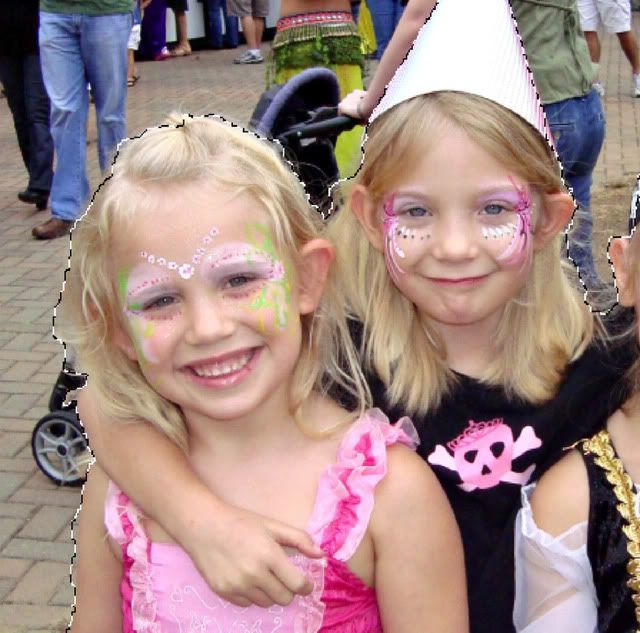


Again, there are probably several ways to do this part, but I’m just going to show you the way I am most comfortable with.

Click on Filters --> Blur --> Lens Blur
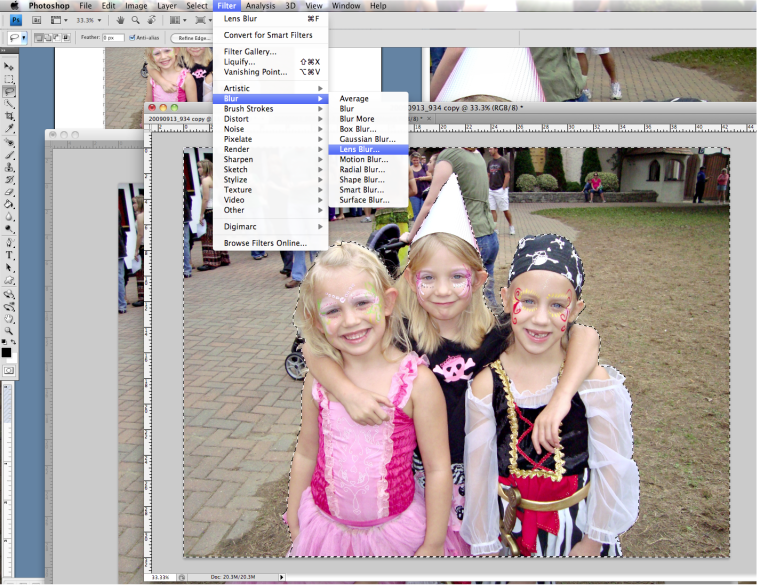


Adjust the settings to your liking, I changed 'radius' to 30, but I didn’t change them much from the default.
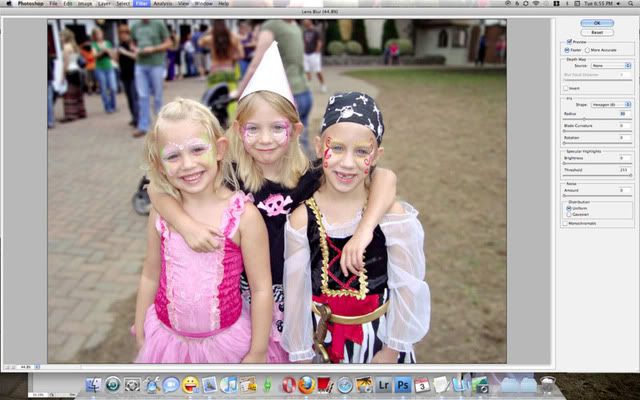


Here’s it is after the filter is applied
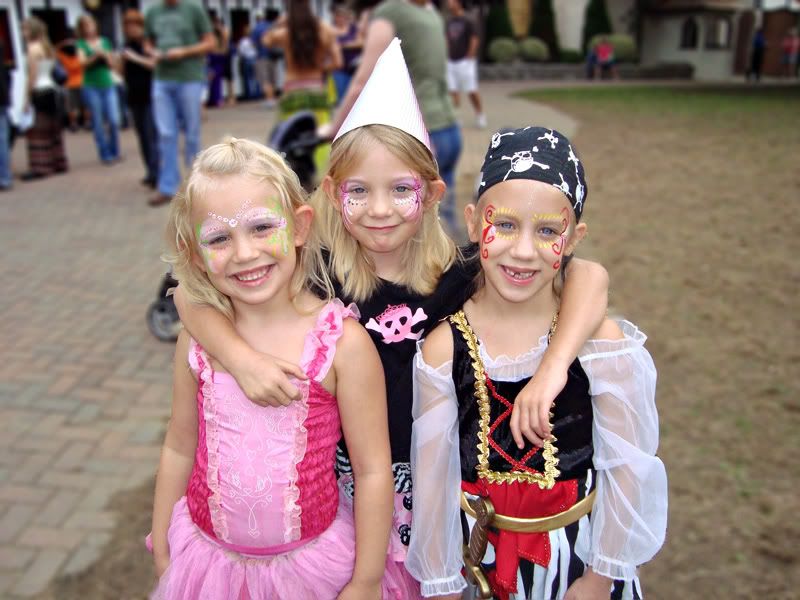


And the before and after:
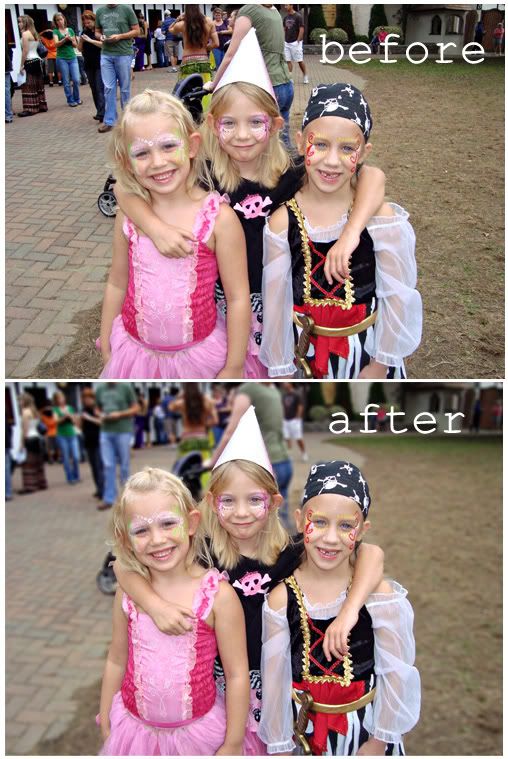


Whew! If you made it this far, thank you! I hope you enjoyed this tutorial, it was my very first, so thanks for being my guinea pigs! If you try it out post a link to your photo in the comment section, we'd love to see them!!

{Hugs}

Alix

Read more...
Related Posts with Thumbnails

Disclaimer

As a creative team member for several digital scrapbook designers, I have received their products for free in return for creating and posting projects (digital layouts, hybrids projects, etc). Many of the layouts you see here were done in conjunction with requirements for these creative teams. Please be advised that the products used were indeed received for free.
The Daily Scrapper - Topsites Best Scrapbooking Sites, Digital Scrapbooking, Scrapbook Supplies, Reviews, Awards
List of the Best Digital Scrapbooking Websites by Scrapbook MAX!SCRAPBOOKING TOP 500 The Daily Scrapper - Topsites Free Digital Scrapbooking

  © Blogger templates Newspaper III by Ourblogtemplates.com 2008

Back to TOP