Tuesday, July 6, 2010

Tidbit Tuesday

Its Heather here with your tidbit tuesday. I hope everyone had a good long weekend for the forth. I do believe tuesdays after a monday holiday are worse than normal mondays LOL. Today I am going to talk about coupon codes online. I tell people all the time, before you shop for anything online make sure to look for coupon codes. Especially places like childrens place or even dominos. Just go to google and type in "dominos codes" or "childrens place codes" and then click around. Occassionally you will find a code that doesn't work but don't give up. Seriously the other day I got two pizzas, bread sticks, cinnastix, and two two liters for 16 dollars. Which was amazing, we fed all 7 of us for that price. Anyway hope that helps someone :)

-Heather

Read more...

Monday, July 5, 2010

Meals in Minutes: A Picnic Favorite


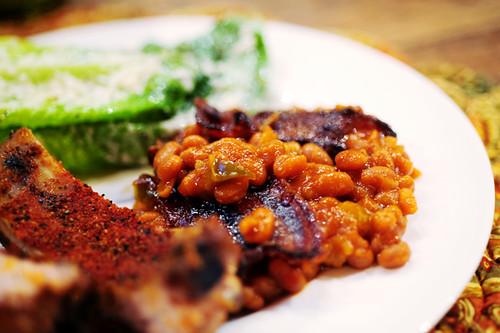
Hi! Kristin here, bringing you this week's Meal in Minutes. Now, obviously you can't just eat these and these alone for lunch or dinner, but you could... because they are that good! I'm not a huge baked bean fan, generally. But I was in charge of the baked beans for our last family get-together and I had heard nothing but awesomeness about the Best Baked Beans Ever on the Pioneer Woman's blog. So I gave it a whirl. In the past, if I made baked beans, I dumped them out of a can and heated them up on the stove. So this was quite the project for me. It wasn't hard. But there were definitely more steps than opening a can, dumping them in, and heating the beans up. But it was well worth it. I highly recommend you make these for your next picnic or family reunion. But just know- they'll keep asking you to bring them.

Quick Southern-Style Baked Beans
recipe by Pam Anderson

Serves up to 18

8 slices bacon, halved

1 medium onion, cut into small dice

1/2 medium green pepper, cut into small dice

3 large cans (28 ounces each) pork and beans

3/4 cup barbecue sauce

1/2 cup brown sugar

1/4 cup distilled or cider vinegar

2 teaspoons dry mustard or 2 tablespoons Dijon

Adjust oven rack to lower-middle position and heat oven to 325 degrees. Fry bacon in large, deep sauté pan skillet until bacon has partially cooked and released about 1/4 cup drippings. Remove bacon from pan and drain on paper towels. Add onions and peppers to drippings in pan and sauté until tender, about 5 minutes. Add beans and remaining ingredients bring to a simmer. (If skillet is not large enough, add beans and heat to a simmer then transfer to a large bowl and stir in remaining ingredients). Pour flavored beans into a greased 13-by 9-inch (or similar size) ovenproof pan. Top with bacon, then bake until beans are bubbly and sauce is the consistency of pancake syrup, about 2 hours. Let stand to thicken slightly and serve.

That's it! Easy peasy! And, while you're waiting for them to bake, you might as well get those 4th of July pictures off of your camera and start scrapping! While it's not made to be a 4th of July kit, I love Jen's Rough & Tumble kit and it would definitely make some CUTE 4th of July layouts with the color scheme and all the stars she's included in the kit.

Read more...

Saturday, July 3, 2010

Saturday School - Another Shadowing Technique

Happy Saturday! It's Kate here to show you another technique to make realistic drop shadows in Photoshop. If you missed the post on basic dropshadow techniques, just rewind to last Saturday and catch up before we start today's tutorial. Ready? Okay, this is what my layout looked like when I finished up last week...


Now I'd like to focus on the circle element on the left and it's shadow. What do you see?

The circle element's shadow is falling on the background paper, a ribbon that's layered onto the background paper and a paper mat that's layered over the ribbon. If the layout were made from real bits of paper and ribbon, the shadow would fall differently on all three layers, but it looks exactly the same. We're going to fix that.

The first thing we need to do is to separate the shadow from the element. To do that, highlight the layer and right click on the 'fx' symbol. Then choose 'create layer' from the menu (almost all the way at the bottom). Next duplicate the shadow layer twice. We now have the element and three drop shadows. You'll notice that the drop shadow looks much darker. That's okay for now. 

Now we're going to hide two of the shadow layers and erase the portions of the third that fall on the ribbon and paper mat. Ctrl-click on the box on the layer that has the frame to select it. You should see the 'marching ants' around the frame. Making sure that the shadow layer is selected, click 'delete' on the keyboard to erase the portion of the shadow falling on the paper mat. Repeating the process with the ribbon, our layout looks like this -
 

Now we're going to select the second shadow layer and move it slightly in the direction of the light, then erase the portion of the shadow falling on the background paper and the paper mat. We'll repeat the process with the third shadow layer, moving it closer to the light than the second shadow and erasing everything except the part of the shadow falling on the paper mat. Now the shadow looks much more realistic with the bigger shadow falling on the surface that is farthest away from it.

If you want to get look that's a bit more realistic, then make each drop shadow separately instead of simply duplicating the one and moving it. You can also adjust the darkness of the shadow - a closer shadow will usually be darker than one falling on a surface further away. This is what it looks like after I adjusted the middle shadow to an opacity of 84% and the bottom shadow to 47%.
 

The shadow looks even more realistic now. There are many other ways you can adjust drop shadows to achieve different effects... but they're the subject for another day. Thanks for stopping by and have a great Saturday!

Read more...

Friday, July 2, 2010

July Monthly Challenge

Happy July everyone! Kristin here... and before I tell you what the July challenge is, I need to announce the winner of June's challenge! Trusty random.org chose #9, who is.... Alli! Alli's favorite JFD kit is Tomorrow's Another Day. If you don't have this kit, yet, this is a must have. Run over to the store and get it! And congrats, Alli! Email Jennifer at jenniferfoxdesigns@yahoo.com for your $5 gift certificate!

Now, onto July's challenge. I don't know if you have ever perused Jennifer's gallery, but it is divine. Check out a couple of her fabulous layouts.


Snowboarding using Rough and Tumble

Beautiful using A Flower in my Pocket

For July's challenge I want you to pick one of Jen's layouts and lift it! When you're done, comment here with a link to your layout. Next month we'll choose a winner and they will receive a $5 gift certificate to Jennifer Fox Designs! Now go! Get inspired!


Read more...

Thursday, July 1, 2010

It's July...I Can't Believe It. (Plus a Random Giveaway!!!)

Hi everyone! Jennifer here just to say hi! I don't have any new releases this week, so I thought I'd pop in and fill you in on what's going on around here lately. First of all, I'm thrilled to annouce that I'm July's Guest Designer at Log Your Memory!!! There are lots of fun things in store for you this month, including a super fun Guest Designer Challenge Chat at 9pm Eastern on Thursday, July 8th. Mark your calendar now--you don't want to miss this!!! All month long there will be prizes, giveaways, contests, etc. so be sure to stay tuned at LYM every day...you never know what you may find!

It also just happens to be my birthday month!!! My birthday is July 5th and I wouldn't be too shocked to find something special here for you on Monday!!! Be sure to stop back by to see what we have in store for you.

By the way, have you taken a minute to apply for my Guest Creative Team Call??? The call ends tomorrow at midnight EST and you don't want to miss this chance to join my fabulous team for a month. :)

Finally, with so much going on, be sure to follow me on Twitter and "like" my design page on Facebook. There are always fun little promos going on and my CT girlies are fabulous with surprises!

Now, since you made it this far through my rambling, I'm in the mood for a little giveaway. This is super simple. All you have to do is leave me a comment and tell me what kit you'd like to have from my store at The Digichick. I'll come back tonight to pick one random winner to win the kit of his/her choice!

Have a wonderful Thursday!!!

Read more...
Related Posts with Thumbnails

Disclaimer

As a creative team member for several digital scrapbook designers, I have received their products for free in return for creating and posting projects (digital layouts, hybrids projects, etc). Many of the layouts you see here were done in conjunction with requirements for these creative teams. Please be advised that the products used were indeed received for free.
The Daily Scrapper - Topsites Best Scrapbooking Sites, Digital Scrapbooking, Scrapbook Supplies, Reviews, Awards
List of the Best Digital Scrapbooking Websites by Scrapbook MAX!SCRAPBOOKING TOP 500 The Daily Scrapper - Topsites Free Digital Scrapbooking

  © Blogger templates Newspaper III by Ourblogtemplates.com 2008

Back to TOP