Showing posts with label Tidbit Thursday. Show all posts

Tuesday, February 8, 2011

Tidbit Tuesday - What is Cystic Fibrosis?

Hello readers, Kara here with today's tidbit.How many of you out there have heard about Cystic Fibrosis? Okay, how many of you really know what CF is? Sadly CF is not a disease a lot of people know about, and today I want to share my story, and share with you all what CF is. I am living with this deadly disease daily, and the past 6 years I have had numerous surgeries, many close calls, and not only has it taken a toll on my health in general, it has taken a toll on my marriage, and my role as a mother. The information I will be giving you is all from the webiste www.cff.org (Cystic Fibrosis Foundation) I kindly ask you to take the time and read about CF, spread the word, I would like to get this disease more national attention.


What is cystic fibrosis?
Cystic fibrosis is a life-threatening genetic disease that causes mucus to build up and clog some of the organs in the body, particularly the lungs and pancreas. When mucus clogs the lungs, it can make breathing very difficult. The thick mucus also causes bacteria (or germs) to get stuck in the airways, which causes inflammation (or swelling) and infections that lead to lung damage.
Mucus also can block the digestive tract and pancreas. The mucus stops digestive enzymes from getting to the intestines. The body needs these enzymes to break down food, which provides important nutrients to help people grow and stay healthy. People with cystic fibrosis often need to replace these enzymes with medicine they take with their meals and snacks, which helps them digest food and get proper nutrition.

Who gets cystic fibrosis?
Approximately 30,000 children and adults in the United States have cystic fibrosis. An additional ten million more—or about one in every 31 Americans—are carriers of the defective CF gene, but do not have the disease. CF is most common in Caucasians, but it can affect all races.
The severity of cystic fibrosis symptoms is different from person to person. The most common symptoms are:
  • Very salty-tasting skin
  • Persistent coughing at times producing phlegm
  • Frequent lung infections, like pneumonia or bronchitis
  • Wheezing or shortness of breath
  • Poor growth/weight gain in spite of a good appetite
  • Frequent greasy, bulky stools or difficulty in bowel movements
  • Small, fleshy growths in the nose called nasal polyps
New research shows that the severity of CF symptoms is partly based on the types of CF gene mutations (defects) a person with the disease has. There are more than 1,400 different mutations of the CF gene.


How do people get cystic fibrosis?
Cystic fibrosis is a genetic disease. This means that people inherit it from their parents through genes (or DNA), which also determine a lot of other characteristics including height, hair color and eye color. Genes, found in the nucleus of all the body's cells, control cell function by serving as the blueprint for the production of proteins.
To have cystic fibrosis, a person must inherit two copies of the defective CF gene—one copy from each parent. If both parents are carriers of the CF gene (i.e., they each have one copy of the defective gene, but do not have the disease themselves), their child will have a 25% chance of inheriting both defective copies and having cystic fibrosis, a 50% chance of inheriting one defective copy and being a carrier, and a 25% chance of not having CF or carrying the gene.

What is the life expectancy for people who have CF (in the United States)?

There is no way to accurately predict how long a person with cystic fibrosis will live, as many different factors affect a person’s health. Severity of disease and time of diagnosis are two such factors. Many people have a mild case of CF, while others can have moderate or severe cases.
In addition, some adults with cystic fibrosis have only recently begun to use new treatments, while an infant diagnosed at birth will have the advantage of starting specialized treatments that were not available even a decade ago.
Data from the CF Foundation Patient Registry, a tool that tracks health statistics from patients treated at CF Foundation-accredited care centers, shows that more than 45 percent of all people with CF in this country are 18 years or older. Also, the Foundation calculates the median predicted age of survival for people with CF. This number is based on a statistical method of using life table analyses developed by insurance companies to calculate trends in survival.
In 2008, the median predicted age of survival rose to 37.4 years, up from 32 in 2000. The median predicted age of survival is the age by which half of the current CF Patient Registry population would be expected to survive, given the ages of the patients in the registry and the distribution of deaths in 2008.
The steady rise of the median predicted age of survival suggests how improvements in treatment and care are advancing the lives of those with CF. In 1955, children with CF were not expected to live long enough to attend grade school. Today, thanks to continued Foundation-supported research and specialized care, an increasing number of people with cystic fibrosis are living into adulthood and leading healthier lives that include careers, marriage and families of their own.


These are pretty much the basics, there of course is much more to read at you can do that by visiting www.cff.org

Now, I would like to show you what a CF patients lungs look like, and what a person who does not have CF lungs look like

Normal Chest X-ray
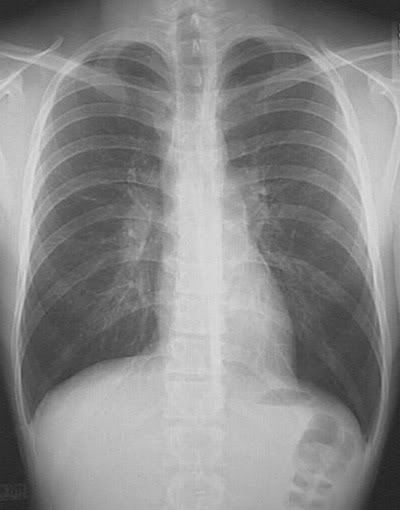
CF X-ray
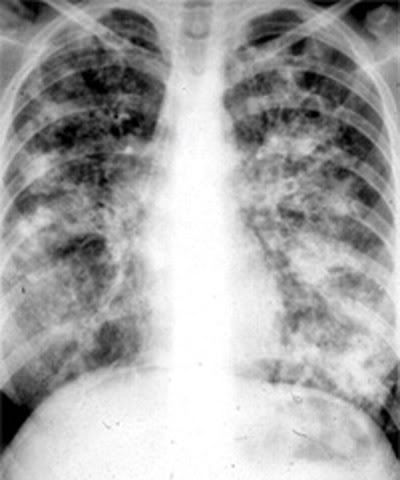
PLEASE help spread the word about CF, do what you can to help find a cure, I'm fighting for my life, as well as may of my friends!! Thank you for taking the time to do so.

Xoxo,
Kara


Read more...

Thursday, May 13, 2010

The useful, the cheap, and the funky!

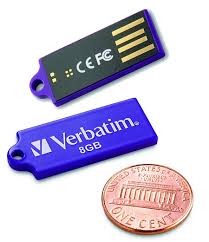
Happy Tidbit Thursday everyone! Heather here to give you a little bit of insight to flash drives, thumb drives, or whatever else you may call them.

Since we all live in different parts of the world, we can find them in many different places. Here are a few of my favorite useful flash drives:

The SanDisk Ctuzer. These come in many different sizes and with their slider opening there is no cap to loose!


The Lacie instaKey and imaKey. This is a fabulous flash drive that also comes in many sizes and two other styles. Check out the Lacie website for complete pricing and info. My favorite thing about this one? It's gold plated which makes it scratch resistant and water resistant so there is no need for a cap and you can keep it on your keys!


Another super handy one. Gold plated again so it can get stuck somewhere safe and you don't have to worry about scratching.


For those of you living near a Microcenter they make a flash drive that can be purchased at the counter. They are normally a little bit cheaper than the brand names ones and work just as well. Drawback? It has a cap.


Kensington makes a pretty sweet drive too! It also has a cap, but it's not to expensive!


Now for some funky ones!!!


I'm no nascar fan, but this flash drive makes me giggle. It's just so silly!!


umm, yes please! how could you not want to sport a lego flash drive?


a biodegradable flash drive.


kissing octopuses flash drives!


I'm no Canon user, but I would even sport one of these!

So there you have it! Leave us some comments with your favorite flash drives so we can all find some new favorites!

Read more...

Thursday, May 6, 2010

Tidbit Thursday - Get Organized!

Morning everyone!  So by now I'm hoping you followed my advice on Google Reader (see this post) to make your life a little simpler when it comes to blog reading.  Now I'm going to try and Organize you!  One of the best tools I've found to try and stay organized is Google Calendar.  No, I don't work for Google, I just like having everything in one spot.  I am pretty much always near a computer, and I like the web-based calendar because I can also access it when I don't have my own laptop.

After you log in to Google, click on the Calendar link at the top.   It'll look like this:


You can customize it by Day, Week, Month, etc. across the top.  Down the right side are your tasks - both completed and not (until you clear them).

To add a new Event, just click either on the time you want to schedule the event, or at the top in the box under the date.  This will pop up:


If it's a simple event, just type it in and away you go.  If it's more detailed or recurring, click on 'edit event details' and this box will pop up:


You can set things to recur annually, weekly, monthly, etc.  It's a great way to remember birthdays (and if you see by my Calendar, it was my dad's birthday yesterday).  Click OK on the bottom (not shown on my screenshot) and it'll set up your event!

You can also use Google Calendar for tasks - and I have to tell you this has organized me so much!   I even use Google Calendar for my scrapbooking! No joke! I am on a few CT's and it can get confusing which day to upload new layouts, so as soon as I'm done a page with a kit that's not released yet, I put a task in my Calendar on the day I need to upload it so I don't forget.  I have a good memory, but it's short, so I also sometimes put chores or even grocery lists on there as I remember them.  To add a task, click in the box under the date and click on 'task'.


For my layout purposes, I just put the title of the layout as the task, and the credits in the notes field - so it's all there and handy when I go to post the layout on the day I should.  I also put tasks there when I need to download a kit I purchased so I don't forget (if I don't do it right away).


See, it's even telling me I have to do a blog post for Jennifer Fox today.  Guess I can check that one off now!

So there's a review of a handy little tool to keep you organized!  Don't forget that Jennifer still has her grab bags for sale in her shop - grab them before it's too late!

Read more...

Thursday, April 29, 2010

Tid-Bit Thursday! Let's Get Ready for iNSD!

Hi All! Erin here with today's Tid-Bit Thursday! So as many of you know, this weekend is {inter} National Scrapbooking Day!! So that means lots of sales - and I'm here to help! I've checked some of the major forums and found some great resources for all weekend events and sales.

Starting at DigiShopTalk - they have a whole section in their forum dedicated to iNSD. You can go there to chat, look for sales, activities, freebies, RAKS, games and contests.

Persnickety Prints has some coupons posted on their site! (including an awesome one for Jennifer!)

Log Your Memory has a great iNSD planner - you can check out the details here.

If you are on twitter - follow The Daily Digi as they will be tweeting on Saturday about all the great deals they found around digiland.

So that's all I was able to find - please check back because I will be updating as I hear about more iNSD news!

Read more...

Thursday, April 22, 2010

Thursday Tid-Bit - Printing!

Hi All! Erin here with today's Thursday Tid-Bit :) I thought that I would share some photobook prices so you all can get your fabulous pages/books printed! I must be honest - I haven't printed any of the pages I've created in the past year. So I'm excited about this post too!

I decided to check out these sites Shutterfly, Persnickety Prints, Artscow and Snapfish. And since I scrap 12x12, I will be sharing those prices. If you scrap smaller, the prices will be less :)

First up is Shutterfly. They currently are running a promo until April 29th for up to 30% off all photobooks. And another promo for free shipping over orders of $30. So what's the base price for a 12x12? It's $54.99 for a Hard Photo Cover.

Next up is Persnickety Prints. I couldn't find any promos (there might be some though!) so the base price for a Classic 12x12 Photobook is $39.99.

Now let's look at Artscow. A custom book with 40 pages is $44.99. They also have a promo running until April 26th for 30% off all personalized photo gifts.

I know there are more places out there - but I thought I would only put 4 up on the blog. So our last stop is Snapfish. The starting price is $49.99 - they do have a promo for Mother's Day for 20% off the first 20 pages.

So there you go - a couple of different places to get your books printed and some info on the current promos. I hope this helps you all out! Have a fabulous Thursday! (and don't forget to check out Jennifer's new release - Raining on Sunday!)

eta: I just got an email this afternoon from Shutterfly. 50% off their photobooks if you use this code: EXTRA29 it expires April 29th (thought I would share :) )

Read more...

Thursday, April 15, 2010

I am not a blogger (Tidbit Thursday)

Really, I'm not. This isn't something I look forward to doing. My husband thinks that I'd be a natural at this blogging thing, yet it instills a fear into my heart like no other...except maybe public speaking and losing my children or husband. So if I'm so petrified of blogging, why is he convinced that it's something I could and should be doing and doing well?

Well my fair readers, I am a journaler, a writer at the heart of it. I'm not an artist, I never even liked to color. I love to tell a story though, any story. It's in my blood, it's so embedded in me to tell stories that I can't avoid doing it. Just ask my husband...I never shut up! In my scrapbooking, I've found a viable outlet for those stories. For the tales of my life, what makes me...me.

There are moments though, like this afternoon, where I wish I didn't feel a compulsion to tell the story. I sat here at my laptop and typed up some journaling that had me bawling. We're talking box-of-tissues-the-doorbell-better-not-ring-because-I'm-a-blubbering-mess sort of journaling.

I tweeted that my journaling had my in tears and got a couple responses about how they'd be there too. One response had me thinking about what I was doing though. I'll paraphrase the response for you:
When your authentic feelings hit the page. It is cause for celebrating those tears. They are who you are.
Pretty profound, eh? Well, I thought so. And that brings me to my point for this post. We are the story. Those feelings, those tears, those smiles, frustrations, laughs...they are us. Embrace that and know you're doing something wonderful for yourself and your loved ones.

Until next time!

Leila

Read more...

Thursday, April 8, 2010

Tidbit Thursday - How to make a fantastic Siggy

Good morning all (or good afternoon.evening if you're reading this later!). Trina here with your Tidbit Thursday - how to make a fantastic Siggy. If you spend any time in digi-scrap forums, you will have noticed that these neat signatures are becoming more and more popular, and it's neat to see how people scrap their name. I've seen a lot of posts in different places asking how to do this, so here is a tutorial I created for you, so that you can be awesome too!

I've found that the easiest way to start is to open a new document at 12x12 like you would if you were scrapping a 'normal' page. That way you can work and not have to resize as you go, but just at the end. Find an alpha you love and spell out your name. I used the alpha from Jennifer's new My Birthday Boy kit. Add shadows, etc and line it up how you want.


Next, open up your kit you want to use (I decided to stick with My Birthday Boy for the whole siggy) and pick the elements you think you might want to use. Drag them onto your Photoshop workspace to open them.

Every time I make a siggy I always start with a ribbon or string or something curly after placing my letters.

I erased bits of my ribbon to make it look like it is weaving in and out of the letters.

Then I chose some other elements and placed those where I liked them. Stay true to your style when you're making your siggy - if you love to cluster, go for it! If you're a Clean & Simple gal (or guy), scrap it that way too.

Now if you want to show off your teams, put a text box underneath - but don't make the text too small, you still want it visible when you resize your siggy.

Ok, well I think I like that, so now it's time to resize - the trickiest part. Select your crop tool and crop fairly close to your design, but leave a little bit of room to play with. Accept the changes and your canvas will shrink a lot.

Then change your image size (Image--> Image Size). Every forum has different rules for how big photos can be in your siggy, so check your favorite forum for their rules and abide by them. Some forums only allow 150 px by 50 px (a standard blinkie size). This may make your text un-readable, you'll have to change it and then see how it looks. I chose to make mine 300 px wide, and since I have 'constrain proportions' selected, it automatically picked the height for me.

The final step is to upload to photobucket (or similar) and paste the [img] code in the siggy section of your profile at any of your favorite digi-scrap sites. And voila, you're done! If you have any questions, please leave a comment here with your email address and I'll try to answer them to the best of my knowledge.

If you're wondering where the new release is, there isn't one today! TheDigiChick site is doing some spring cleaning and there are no new releases this week. But if you like the alpha from my siggy, above, check out Jennifer's new kit from last week - My Birthday Boy.

Read more...

Thursday, April 1, 2010

My venture into photography...

Hi everyone! Kat here... So I finally watched my Magic Lantern DVD this weekend and decided that I was going to take my D80 off of Auto mode. I'm trying out Aperture Priority for now. From what I understand, it's pretty easy to learn more about my camera by doing this rather than jumping into straight manual mode.

Here's a few pics I took this weekend that I think are pretty darn good:


Of course I have a LONG, LONG way to go before I will even consider myself a photographer but I *think* I'm finally starting to "get" it. LOL!!! I think I'll be spending a lot more time over at Clickin' Moms to hopefully learn how to use my camera even better.

If you have any links for any other good photography sites, I would love to hear from you!

Read more...

Thursday, March 11, 2010

Tidbit Thursday & a New Release!

Good morning everyone! Trina here with your tidbit Thursday and to show off Jennifer's gorgeous new release and re-releases for the week at The Digi Chick. Warning, this is a long post with a LOT of eye candy - so grab a coffee, sit back and relax!

First up, your tidbit to try and make your life easier. I just recently discovered Google Reader. Google what? Reader. Now if you already use Google Reader, you know it's the best invention since sliced bread. If you don't, RUN over to http://www.google.com/reader/ (after you read the rest of this post). You will never again miss blog posts from any of your favorite blogs, especially this one!

How it works - you put in the blogs you like to keep tabs on (look for "manage subscriptions"), and once you add them, it keeps track of posts for you. The best part is it tells you when the blogs have been updated and you can read them from your google reader, so you don't have find the bookmark, go to all these different sites, it's all handy and located in one spot (and as a bonus, it saves so much time!).


******

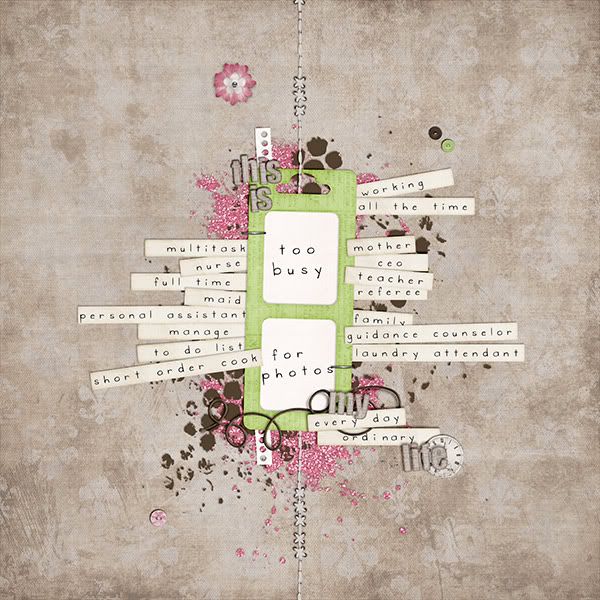
So now that you've got Jennifer Fox Designs in your Google Reader, do I ever have a treat for you! Jennifer has been super busy and she created this brand new kit inspired by all the jobs that women do. "This Woman's Work" is soft, pretty and full of gorgeous elements!


I could look at it for days. And check out what some of the CT has done with it!

Leila did this one, I love everything about it, especially the 'Too Busy for Photos'.

From Laura:


By Leah:


By Alli:


There are going to be so many great pages using this kit, I wish I could feature them all, but then you'd really be here forever!

Next up, Jennifer has re-released some older kits that are wonderful! First, she broke open her Happy Chick grab bag and you can get the parts here:


Shiny Happy Grunge Alpha

Silly Stripes Alpha

Scraps to Go Vol. 4 - Crazy Clusters

Happy Chick Cardstock

Happy Chick Kit

And if that wasn't it, Jennifer has also re-released her Color Burst collection!

Buy the bundle and save!

Or, you can pick your favorite parts of it:

Color Burst Alpha

Color Burst: Sun Burst Papers

Color Burst Full Kit

Glitter Burst

And Pretty Bloggie: Color Burst

:Last but not least, Jennifer has re-released her element pack "I've been Pinned"
Head on over to Jennifer's store at The Digichick today and grab these goodies while they're 20% off!!!

Read more...

Thursday, March 4, 2010

Tidbit Thursday - Making Marshmallows!

Good day, everyone! Rebecca (mamabee) here today with a treat... how to make homemade marshmallows... yes marshmallows!! A few years back I was watching the Food Channel and they had interviewed someone who had started a business out of their kitchen making marshmallows. I wasn't looking for a new business, but I was intrigued by the fact that this was a treat that you could make at home. I searched the web and found a recipe... Oh my goodness... you haven't had a smore or rice crispy bars until they are made with homemade marshmallows. And they are so easy to make... trust me, I'm not a baker, I don't have the patience, but this is a candy I can do.

Here is what you will need...

3 envelopes of unflavored gelatin

1 cup ice cold water, divided

1 1/2 cups sugar

1 cup light corn syrup

1/4 teaspoon salt

1 teaspoon vanilla

1/4 cup powdered sugar

1/4 cup cornstarch

nonstick spray

Mixer with whisk attachment and bowl (I use a standing mixer because you will beat a long time)

candy thermometer

Saucepan

Pan, either a jellyroll pan or a 9x13... greased


Step one: In a mixing bowl, place the 3 packages of gelatin and 1/2 cup of the cold water so it can "bloom". Also prepare the pan by spraying with the nonstick spray. Mix the powdered sugar and cornstarch and dust the pan on the bottom and sides, keep the extra mix.

Photobucket

Step two: In a saucepan combine the sugar, corn syrup, salt, and the rest of the ice cold water. Clip on the candy thermometer and cook until the mixture is 240 degrees... it will take about 10 minutes.

Photobucket

Step three: Turn the mixture on low and slowly add the sugar mixture to the gelatin down the side of the bowl. After all is added, increase the speed to high. Continue to whip until the mixture is very thick and the outside of the bowl is lukewarm... it will take about 15 minutes. During the last minute of whipping, add the vanilla. Note: I have even flavored with peppermint extract in place of the vanilla for a light mint taste for Christmas this year... yumm!


Photobucket

Photobucket


Step four: Transfer the thick mixture to your prepared pan and smooth out.... it will be sticky. If you spray your spatula with non-stick spray, it does help. Sprinkle the powder sugar and cornstarch mixture over the top to lightly cover, keep the extra mix.

Photobucket

Step five: Let cool. To cut into square, dust your knife or pizza wheel (or even scissors would work) with the powder sugar mixture and enjoy. Store in an air tight container... or they get really chewy!


Photobucket

I really hope that you try to make some yourself!! They have my son's seal of approval!

Photobucket

{{Hugs}}

Rebecca


kits used: Simply Beauty - Jennifer Fox Designs, The Digi Chick and Funkalicious Fall - Jennifer Fox and Nikki Epperson, The Digi Chick

Read more...
Related Posts with Thumbnails

Disclaimer

As a creative team member for several digital scrapbook designers, I have received their products for free in return for creating and posting projects (digital layouts, hybrids projects, etc). Many of the layouts you see here were done in conjunction with requirements for these creative teams. Please be advised that the products used were indeed received for free.
The Daily Scrapper - Topsites Best Scrapbooking Sites, Digital Scrapbooking, Scrapbook Supplies, Reviews, Awards
List of the Best Digital Scrapbooking Websites by Scrapbook MAX!SCRAPBOOKING TOP 500 The Daily Scrapper - Topsites Free Digital Scrapbooking

  © Blogger templates Newspaper III by Ourblogtemplates.com 2008

Back to TOP